Automating HR Processes with AI Today
Automating HR Processes with AI: A Practical Guide for HR Professionals
Why HR Teams Are Under Pressure - And How AI Is Helping
HR professionals have always worn many hats. You juggle the demands of the organisation, with the pressures of managers and employees needing help and support. But the volume and complexity of those hats are growing. From managing high volumes of job applications (or on the flip end of that scale trying to find those hard to reach candidates for your hard to fill job roles) to producing compliance reports, tracking employee engagement, new employment legislation and supporting a distributed workforce. The administrative burden on HR teams has never been heavier.
According to a 2022 survey by Editions Tissot and PayFit of 713 HR professionals, 63% report spending at least half of their working time on administrative tasks and just think, time that could be directed toward strategic work, culture building, and genuine people leadership.
This is where artificial intelligence is beginning to make a real and measurable difference but most certainly not by replacing the humans in human resources, but by handling the heavy lifting so HR professionals can focus on what they do best.
This article shows you four areas where AI is making an immediate impact and at the bottom of the post provides you with an idea of how Microsoft 365 Copilot could help you and your team.
The Four Areas Where AI Is Making an Immediate Impact in HR
1. Recruitment and Candidate Screening
Hiring at scale is one of the most time-intensive processes in HR. When a single role attracts hundreds of applications, manual screening is both exhausting and prone to unconscious bias.
Real-world example: Unilever implemented an AI-powered screening tool that assessed candidates through video interviews and gamified assessments. The result? A 90% reduction in time-to-hire and a more diverse candidate pool because the AI evaluated capability and fit rather than demographic patterns.
Today, AI recruitment tools can:
Scan CVs against pre-defined criteria and rank candidates objectively
Analyse language in job postings to reduce gendered or exclusionary phrasing
Predict candidate engagement and likelihood of acceptance
Automate interview scheduling and follow-up communications
For HR teams, this means less time in spreadsheets and more time having meaningful conversations with the right candidates.
2. Employee Onboarding and Engagement
First impressions matter. Yet many organisations still rely on manual, inconsistent onboarding processes that leave new employees feeling overwhelmed or unsupported.
Real-world example: IBM deployed an AI-powered onboarding assistant that answered common questions from new hires everything from IT setup to holiday policies 24/7. HR teams reported a significant drop in repetitive queries and new starters reported higher satisfaction scores in their first 90 days.
AI can transform onboarding by:
Deploying intelligent chatbots to answer FAQs instantly, day or night
Personalising learning pathways based on role, seniority, and prior experience
Sending automated check-ins to gauge how new starters are settling in
Flagging potential disengagement signals early for human follow-up
The result is a smoother, more consistent experience for new employees and a lighter load for HR teams on day one.
3. Performance Management and People Analytics
Traditional performance reviews are often retrospective, subjective, and infrequent. AI is enabling a shift towards continuous, data-informed performance management.
Real-world example: Microsoft uses AI-powered people analytics to identify teams at risk of burnout, track collaboration patterns, and recommend targeted development opportunities all before a problem escalates.
AI in performance management can:
Analyse performance data across teams and surface meaningful trends
Identify flight risks and high performers who may need development investment
Suggest personalised training interventions based on skill gaps
Generate objective performance summaries to inform review conversations
Crucially, AI doesn't replace the performance conversation but it makes it richer and better informed.
4. Compliance, Reporting, and Workforce Analytics
Regulatory compliance is non-negotiable, but the manual work of producing reports, tracking policy adherence, and auditing workforce data is a drain on HR capacity.
AI tools can:
Automatically generate compliance reports (gender pay gap, diversity metrics, right-to-work checks)
Detect anomalies in workforce data that may indicate policy violations
Monitor changes in employment legislation and flag where policies need updating
Produce real-time workforce dashboards for leadership decision-making
This not only reduces errors it ensures HR teams are never caught off-guard by a compliance deadline.
The Benefits and the Boundaries: What AI Can and Cannot Do
The Efficiency Gains Are Real
Organisations that have embraced AI automation in HR consistently report:
Reduced time-to-hire and in some cases by over 50%
Lower administrative overhead by freeing HR professionals for more strategic work
Improved employee experience with faster responses, more personalised support and guidance
Better data quality for more confident workforce planning
But Human Judgement Has To Remain Essential
AI is a tool, not a decision-maker. Decisions that affect someone's career, wellbeing, or employment status must always involve human oversight. Organisations must ensure their AI tools are:
Transparent - employees should know when AI is being used in decisions that affect them
Fair and auditable - AI models must be regularly reviewed for bias
Compliant - particularly under evolving legislation such as the EU AI Act or the UK GDPR playing more of an important role
The goal is augmentation, not automation of humanity.
The best HR functions will be those that pair powerful AI tools with sharp human instinct.
How to Get Started: A Practical Roadmap for HR Teams
Getting started with AI doesn't require a wholesale technology transformation. The most effective approach is to start small, demonstrate impact, and build confidence across your organisation.
Step 1: Identify your highest-friction processes.
Where are your team spending the most time on tasks that are repetitive, rules-based, or data-heavy? Candidate shortlisting, onboarding queries, report generation and leave management are common starting points.
Step 2: Run a low-risk pilot.
Choose one process and trial an AI tool for 60–90 days. Measure time saved, quality of output, and employee feedback. Use this data to build the business case for wider adoption.
Step 3: Assess your AI readiness.
Before scaling, it's important to understand where your organisation currently sits on the AI maturity curve. What data do you have available? What are your team's current capabilities? Where are the gaps?
Not sure where to start? The AI Readiness and Maturity Snapshot from AI Automation Dept is a free, AI-powered tool that gives you an early indication of where you are in your AI journey and what your next steps should be. It takes minutes and delivers personalised, actionable insights for your HR function.
Step 4: Invest in people alongside technology.
AI adoption succeeds when your team understands and trusts the tools they're using. Build in time for training, communication, and honest conversations about what AI will and won't change about their roles.
Already Have Microsoft 365? You May Already Have an AI Co-Pilot for HR
For many HR teams, the path to AI doesn't require a brand-new platform or a large technology budget.
If your organisation is already running Microsoft 365, you may be closer to AI-powered HR than you think because Microsoft 365 Copilot is available as a per-user add-on licence that sits directly inside the tools your team already uses every day.
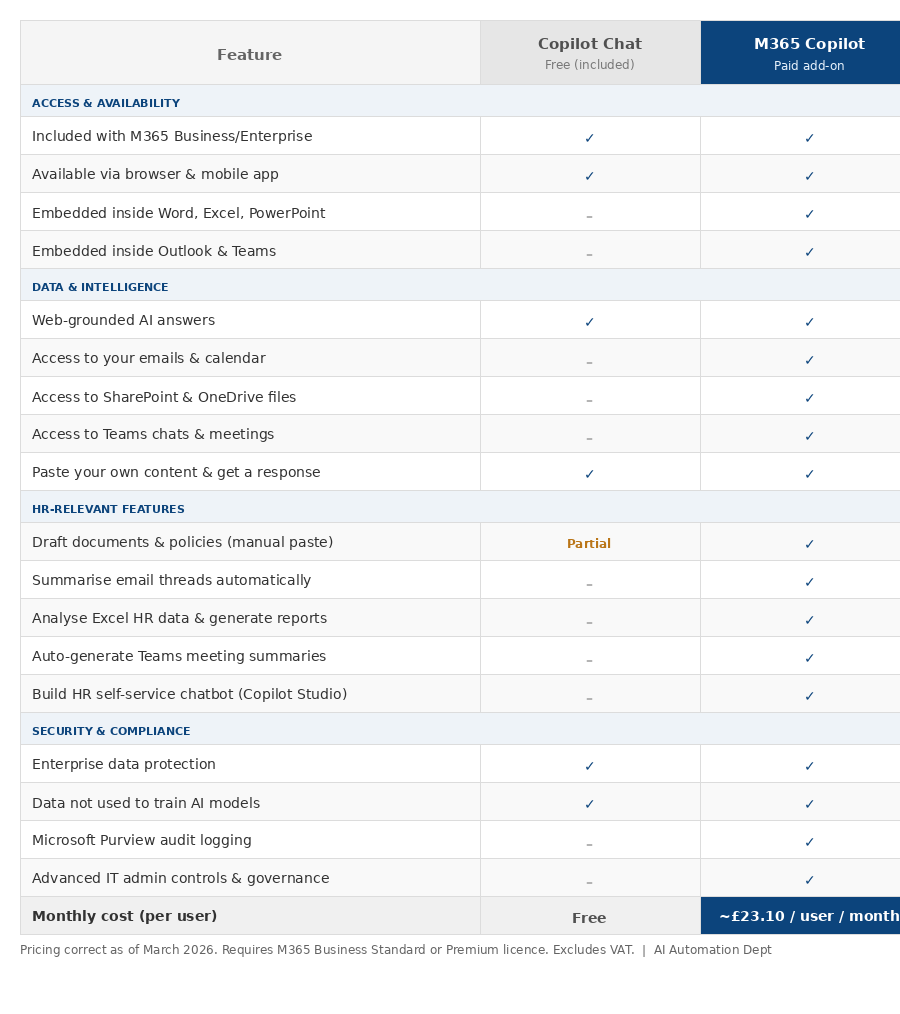
Whilst you can start with the free Copilot Chat version, the licensed version is so much more powerful as you can see from the comparison chart below.
Working in Excel? Copilot becomes your data analyst.
Many HR teams still manage headcount, absence tracking, and pay review data in spreadsheets.
Copilot helps with Excel formulas and data cleanup and for anyone who lives in spreadsheets, it can be a genuine game-changer (don't we just hate that word but it's so apt right here). Rather than spending hours building pivot tables or writing complex formulas, you can simply prompt Copilot: "Summarise absence trends by department over the last six months" and get a clear, structured output in seconds.
Drowning in emails and Teams meetings? Copilot takes the notes.
Copilot generates meeting summaries, key points, and follow-up tasks directly from Teams meetings thus eliminating frantic note-taking and missed decisions. For HR teams running regular one-to-ones, disciplinary hearings, or all-hands calls, this alone can save hours each week. It can also summarise long email threads, highlighting main points and decisions meaning no more scrolling through 30-reply chains to find an agreed action.
Writing job descriptions, policies, and offer letters? Copilot drafts them for you.
In Word, you can ask Copilot to draft a job description based on required skills, qualifications, and responsibilities and it can pull from your existing HR documents to ensure consistency and accuracy. The same applies to policy updates, onboarding documentation, and employee communications. Recruiters can prompt Copilot to summarise multiple CVs into a comparison table, cutting screening time significantly.
Need an internal HR self-service bot? Copilot Studio can build it.
Using Copilot Studio, HR teams can create a self-service agent that answers employee questions covering everything from holiday entitlements to maternity leave policies without those queries ever reaching an HR inbox. This is particularly powerful for organisations with remote or hybrid workforces where employees need answers outside of office hours.
Generating compliance reports and performance summaries? Copilot does the heavy lifting.
Copilot in Excel can identify key manager metrics and generate management summary reports, while Copilot in Outlook can communicate performance findings to HR leadership turning what used to be a half-day task into a matter of minutes.
The important thing to understand about M365 Copilot is that it works within your existing environment your data stays in your Microsoft tenant, and there's no need to migrate to a new system. For HR teams not yet ready to invest in specialist HR-AI platforms, it represents a practical, lower-risk entry point into AI automation that can deliver immediate, visible results.
Not sure if your organisation is ready to make the most of tools like Copilot? The free AI Readiness and Maturity Snapshot from AI Automation Dept will help you identify exactly where you are in your AI journey and which tools are the right fit for where you are right now.
What's Coming Next: Trends Shaping the Future of AI in HR
HR technology is evolving fast. Here are the developments worth watching over the next 12–24 months:
Predictive talent planning: AI tools that forecast workforce needs based on business growth projections, attrition trends, and market conditions
AI-powered employee listening: Moving beyond annual surveys to real-time sentiment analysis across feedback channels
Seamless platform integration: AI embedded directly into existing HRIS platforms - Workday, SAP SuccessFactors, BambooHR etc rather than as standalone tools
Hyper-personalised L&D: Onboarding and learning programmes that adapt in real time to individual performance, career goals, and learning style
Ethical AI governance frameworks: As regulation grows, HR will play a central role in ensuring responsible AI deployment across their organisations
The Bottom Line
AI is not the future of HR but it is the present. Organisations that begin building their AI capabilities now will be better positioned to attract talent, retain top performers, and operate with far greater agility than those that wait.
The opportunity for HR professionals is not to resist this shift, but to lead it shaping how AI is deployed in ways that are ethical, human-centred, and genuinely impactful.
Ready to understand where your organisation stands?
Take the free AI Readiness and Maturity Snapshot from AI Automation Dept and get a clear, personalised view of your AI journey — in minutes.
👉 Try the AI Readiness and Maturity Snapshot — it's free
Published by AI Automation Dept — helping HR professionals and organisations navigate the AI landscape with confidence.
